Custom Software vs. Off-the-Shelf (vs. Spreadsheets): Which Is Right for Your Business?
Custom software vs. off-the-shelf SaaS or spreadsheets: compare the 3-year cost, speed and control, then decide with a simple matrix you can fill in today.
fultura.co Team11 min read
Here’s the short answer on custom software vs. off-the-shelf: off-the-shelf software (a ready-made product you pay for by subscription) is cheaper and faster to start, but you have to work the way the product wants. Custom software costs more up front and takes weeks or months to build, but it fits your process, you own it, and you don’t pay a license for every new user.
If your business runs like most others in your industry, start with off-the-shelf. If the way you operate is exactly what makes you different, or you’ve spent years patching tools and spreadsheets to make them work, custom software usually comes out ahead over three years. And spreadsheets are fine while only a few people use them and the data still fits in your head. Below you’ll see how to compare all three with real math, plus a decision matrix you can fill in today.
What each option actually is
Off-the-shelf software (SaaS)
This is a product that already exists and that thousands of businesses use the same way: accounting software, a CRM for your sales team, an inventory app, a help desk. Almost all of it runs in the cloud now and is billed monthly or yearly, usually per user. That model is called SaaS (software as a service).
The upside: you can start using it in days, the vendor maintains and updates it, and you never think about servers. The downside: you adapt to the product, not the other way around. If it doesn’t do something, you either ask the vendor and hope it ships someday, or you work around it.
Custom software
This is a system built for your business, following your processes, your rules and the names you use for things. It can be a web app, a mobile app, a customer portal, or an internal system that replaces a pile of spreadsheets.
The upside: it does exactly what you need, grows with you and, if you contract it right, you own the code. The downside: you pay for development before you can use it, it takes time, and someone has to maintain it.
Spreadsheets (Excel and Google Sheets)
This is the default for most small businesses. It isn’t really “software for your business,” but with tabs, formulas and some discipline, plenty of companies track inventory, receivables, quotes and schedules this way.
The upside: you already have it and everyone knows it a little. The downside: it wasn’t built for several people working on the same data at once, it rarely shows who changed what, and it depends on nobody deleting the wrong formula.
Custom software vs. off-the-shelf vs. spreadsheets: side-by-side comparison
There’s no winning column here. Each one wins somewhere.
Factor
Spreadsheets
Off-the-shelf (SaaS)
Custom software
Cost to start
Almost nothing
Low: first month plus setup
High: you pay for development
Monthly cost
Little cash, lots of hours
Grows with each user and add-on
Hosting and maintenance; no per-user fee
Time to use it
Immediate
Days to a few weeks
Weeks to months, depending on scope
Fits your process
Yes, through fragile formulas
Only within what the product allows
Completely
Many people at once
Risky
Yes, with permissions
Yes, with the permissions you define
Audit trail (who changed what)
Rarely
Depends on the product
Whatever you decide to log
Connects to other systems
Manually (copy and paste)
The integrations the vendor offers
The ones you need
Scalability
Gets slow and confusing
Good, but price rises with size
Good, if it’s built well
Who owns data and code
You, in scattered files
Your data, yes; the product is the vendor’s
You, if the contract says so
Main risk
Human error and lost files
Price hikes, product changes, vendor shutting down
Hiring the wrong team to build it
Two rows deserve a closer look.
“No per-user fee” is the most underrated difference. With SaaS, going from 10 to 30 people on the system roughly triples the monthly bill. With custom software, adding users barely moves the cost.
“You own the code” is only true if it’s in writing. Some custom projects leave the code with the developer, and you end up just as locked in as with a SaaS vendor. Ask before you sign. Our guide on choosing between a freelancer, an agency or an in-house team has a list of questions for exactly that.
The real 3-year cost: a worked example
The most common mistake is comparing only the first payment. A subscription of a couple thousand dollars a month looks far cheaper than an $80,000 build, and in year one it usually is. The right question is how much you’ll pay in total over three years.
Let’s run an example. These numbers are hypothetical, rounded so the math is easy to follow. They’re not quotes. Real prices vary widely by vendor, scope and who builds it.
Picture a distributor that needs to manage orders, inventory and shipping.
Option A, off-the-shelf:
Subscription: $150 per user per month.
Implementation and data migration: $10,000, one time.
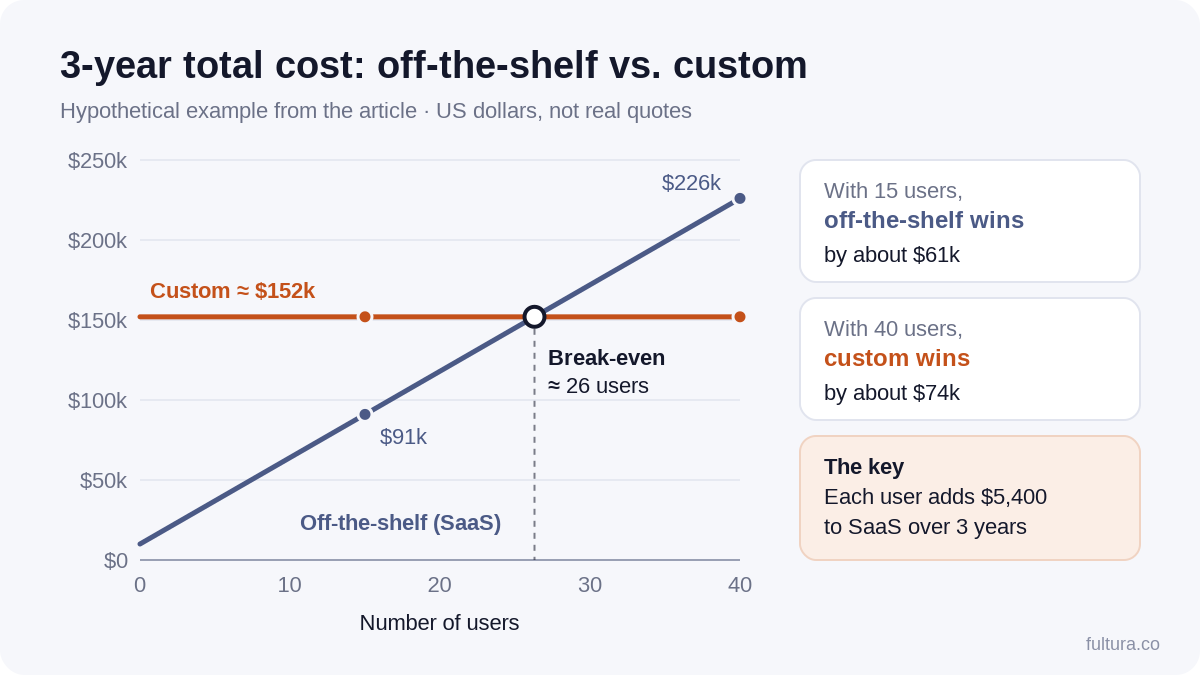
With 15 users: 15 × $150 = $2,250 a month, or $27,000 a year.
3-year total: $10,000 + ($27,000 × 3) = $91,000.
Option B, custom software:
Development: $80,000, one time.
Hosting, support and small changes: $2,000 a month, or $24,000 a year.
3-year total: $80,000 + ($24,000 × 3) = $152,000.
With 15 users, off-the-shelf wins by about $61,000. Now change one input: the business grows and has 40 users instead of 15.
Option A: 40 × $150 = $6,000 a month → $72,000 a year → $226,000 over 3 years.
Option B: the cost barely changes → about $152,000 over 3 years.
Now custom wins by about $74,000. With these numbers, break-even is around 26 users. Below that, SaaS is cheaper. Above it, building is. Your break-even point will be somewhere else, but the exercise is the same.
In the hypothetical example, SaaS cost climbs with every user and crosses custom software at about 26 users.
What moves the custom number. The $80,000 build is the input that varies most. Rates depend on who builds it: US agencies commonly bill well over $100 an hour, while a nearshore team in Latin America typically costs noticeably less for senior engineers. The same scope can be quoted at very different prices. Treat these figures as orientation, and see how much custom software costs for a full breakdown of rates, pricing models and what drives a quote. If the build costs more, the break-even moves to more users. If it costs less, it moves to fewer.
What about spreadsheets? They look free, but the cost is in hours. Say two people each spend 10 hours a week reconciling sheets, copying data between files and fixing mistakes, and their time costs you $35 an hour. That’s $700 a week, or about $36,400 a year, and roughly $109,000 over three years. Plus wrong shipments and decisions made on stale data.
Costs almost nobody adds up
When you run your own numbers, include these too:
Price increases. SaaS plans go up over time, and sometimes a feature you rely on moves to a pricier tier.
Add-ons. The entry price rarely includes everything you’ll end up needing.
Integrations. Connecting the product to your accounting, your online store or your shipping tools can cost extra.
Work done “on the side.” If the product can’t do something, someone does it by hand in a spreadsheet. Those hours count.
Custom software maintenance. Custom isn’t a one-time payment. It needs hosting, security updates and adjustments.
Speed, control and scalability: the other differences
Three other factors sometimes decide on their own.
Time to get it running
A SaaS product can be set up in days. A well-planned custom build can deliver a useful first version in a few weeks and grow from there, but a large system can take several months. If you need something running next month for a standard process, off-the-shelf wins.
One tip if you go custom: ask for delivery in stages. A small version that solves the main problem in one month beats waiting six months for a “complete” system nobody has tested.
Control over the product
With SaaS, the vendor decides which features to add or drop, what to charge, and when to redesign the screen your team finally memorized. With custom software, those decisions are yours. For some businesses that’s a detail. For others, whose process is their edge over competitors, it’s the whole point.
Scalability
Both options can grow. The difference is how the cost grows. Off-the-shelf costs rise with every user, location or module. Custom costs rise when you ask for new features, not when you hire people.
Spreadsheets have a clear ceiling: once several people share the file or it splits into ten linked files, it just gets messier.
When custom software is NOT the right choice
We build custom software, and there are still plenty of cases where we’d tell you not to.
Your process is standard. Accounting, payroll and sales tax work the same way for almost every business, and the rules change with the law. Ready-made tools stay current for you. For example, as of publication, QuickBooks Online handles accounting, Gusto runs payroll and files payroll taxes, and Avalara calculates sales tax inside QuickBooks Online and Shopify. Rebuilding any of that from scratch rarely makes sense.
You don’t know yet how you work. If the process changes every month, get it in order first with a spreadsheet or a simple tool. Building on an unclear process is expensive.
You have few users and a small budget. As the example shows, with a small team the subscription usually wins.
You need something now and nothing about your case is special. Off-the-shelf gives you speed.
Nobody will maintain it. If you won’t pay for support and no one owns it, a custom system can end up abandoned.
A concrete case: if you just need to track inventory for a store or a small warehouse, you probably don’t need a custom build. Our roundup of the best inventory management software for small business compares ready-made options that may fit.
When custom software IS worth it
These are the situations where building usually pays for itself:
The way you work is your advantage. How you quote, how you route crews, how you serve customers. If a generic product forces you to do it like everyone else, you lose what sets you apart.
You’ve tried products and none fit. You pay for two or three subscriptions and your team still lives in spreadsheets to cover the gaps.
Many users, or fast growth ahead. When per-user pricing climbs, building gets cheaper.
You need to connect many things. Your accounting, your Shopify store, your field team, an AI assistant. A system of your own can be the hub that ties it together.
You want to give customers access. A portal or app with your brand, where customers place orders or check status.
If two or more of these sound like you, it’s worth a conversation. In a free 30-minute call we’ll tell you plainly whether your case calls for a custom build, a tweak to something that exists, or just better use of what you already have. You can book it here. We’re a nearshore team in Colombia (UTC-5, so we overlap with US business hours), and you own the code. If your process is standard or your budget is tight, we’ll say so and point you to a product instead.
The custom vs. off-the-shelf decision matrix: score your case
Answer each question with the option that best describes your business today. Each answer adds a point to one of the three columns.
Question
Point to spreadsheets if…
Point to off-the-shelf if…
Point to custom if…
How many people use the information?
1 to 3
4 to 20
More than 20, or growing fast
How standard is your process?
Simple
Same as your industry
Your own, it sets you apart
How much can you invest up front?
Almost nothing
A little
Several months of operating budget
When do you need it?
Now
In a few weeks
You can take delivery in stages
Does it need to connect to other systems?
No
Only the common ones
Several, or something very specific
Are you using tools that don’t fit?
No
No, or you’re just starting
Yes, and you patch them with spreadsheets
Do you want to give customers access?
No
No
Yes
Count which column got most of your answers:
Mostly spreadsheets: keep using them, but organize them well. One sheet per type of data, consistent names and clear permissions.
Mostly off-the-shelf: pick a solid ready-made product and trial two or three before deciding. Check what it will cost when you grow, not just today.
Mostly custom: ask for a staged quote, with a small first version and the code in your name.
A tie between off-the-shelf and custom: combining is probably your best move. Ready-made tools for the standard parts and a small custom build for what makes you different, connected to them.
The option most people overlook: combine them
You don’t have to pick one thing for the whole company. Many small businesses end up with a mix that works well:
Accounting, payroll and sales tax in ready-made tools, because the rules are the same for everyone and change with the law.
The core of your operation (orders, production, routing, service) in a custom system.
A connection between them, so nobody re-types data by hand.
That way you pay for development only where it adds value, and leave the generic work to people who already solved it. The same logic applies to AI: often the best first step is automating a few repetitive processes with AI on top of the tools you already use.
Key takeaways
Spreadsheets work for getting started and for small teams. Their cost hides in hours and errors.
Off-the-shelf software is the best choice when your process is standard, your team is small and you need something fast.
Custom software wins when your process sets you apart, you have many users, or you need to connect several systems.
Always compare the 3-year cost, not the first payment, and run the math with your own user count.
Combining both is often the smartest answer for a growing small business.
Frequently asked questions
Is it better to buy off-the-shelf software or build custom software?
It depends on your process. If you work the way most businesses in your industry do, off-the-shelf software is usually cheaper and faster. If the way you operate is what sets you apart, or no product supports it well, custom software tends to pay off over a few years.
What is off-the-shelf software?
It's a ready-made product that many businesses use the same way, like accounting software, a CRM or an inventory app. Today it's almost always sold as a monthly subscription per user (SaaS), and you adapt to how it works.
How much does custom software cost compared to off-the-shelf?
Custom software costs more up front because it has to be built, but you don't pay a license for every user. Off-the-shelf is cheap to start and its cost grows with users and years, so compare the total cost over three years, not just the first payment.
When should a business stop using spreadsheets?
When several people edit the same file, different versions of the truth appear, you lose hours reconciling data, or your team needs the information on their phones. At that point the spreadsheet is costing you more than it looks.
Can you combine off-the-shelf and custom software?
Yes, and it's often the smartest option. Use ready-made tools for standard work like accounting, payroll and sales tax, and build custom only the part that makes you different, connected to those tools.
custom software vs off-the-shelfcustom softwareoff-the-shelf softwareSaaSspreadsheetssmall business
Not sure whether to build or buy?
Tell us how your business runs today. In a free 30-minute call we'll tell you honestly whether an existing tool, a tweak to what you have, or a custom system makes more sense, and roughly what each path would cost.
How much does custom software cost in 2026? Price ranges by project type, US vs nearshore rates, pricing models and hidden costs, so you can compare quotes.
Freelancer vs agency for software development: compare US costs, risk and control against an in-house team or nearshore, plus red flags and a hiring checklist.
The best inventory management software for small business in 2026: Sortly, Zoho, QuickBooks, Cin7 and more. Who each one fits and how to choose in an afternoon.
 In the hypothetical example, SaaS cost climbs with every user and crosses custom software at about 26 users.