AI Automation for Small Business: 10 Processes to Automate in 2026 (and What to Leave Alone)
AI automation for small business: 10 processes worth handing to AI in 2026, what each one needs, rough costs and payback, and what you should not automate.
fultura.co Team12 min read
AI automation for small business doesn’t mean letting a robot run the company. It means taking the repetitive work built on text, messages and documents off your team’s plate: answering the same customer questions, keying invoices into a spreadsheet, building quotes, writing the weekly sales summary. The AI writes the first draft or the first reply, and a person checks what matters.
The processes that pay off meet three conditions: they happen many times a day or week, they follow roughly the same pattern, and a mistake can be caught before it does damage. Below are 10 that fit, with what each one needs, a rough idea of cost and benefit, and an honest list of what you should not automate.
What AI automation means (and how it differs from what you already had)
Rules like “when a payment comes in, send the receipt” are old news. What’s new is that AI can handle tasks that used to need someone to read and understand:
Understanding messages written the way people write (“same bolts as last time but longer?”).
Pulling data from documents with no fixed layout, like a supplier’s PDF.
Drafting a reply, summary or product description in your voice.
Sorting: complaint, order or spam.
What AI does not do is guarantee accuracy. It can be confidently wrong or make up a detail. That’s why automations that work keep a person at the point where a mistake costs money.
How to tell if a process is worth automating
Before you look at the list, ask these five questions about the process you have in mind:
How often does it happen? Three times a month almost never pays back. Thirty times a day usually does.
How long does it take each time? Multiply by frequency. That’s the time you could get back.
Does it follow a pattern? If every case is different and needs judgment, AI will help less than you hope.
What happens if it goes wrong? A typo in a product description gets fixed. A payment sent to the wrong account doesn’t.
Where does the data live? If the information is on paper or in one person’s head, organize it first.
Pass all five and it’s a strong candidate. Fail question four and you can still automate it, with mandatory human review.
10 processes to automate with AI in 2026
For each one: what the AI does, what you need, and where the catch is.
1. Customer support by chat and text
What the AI does: answers common questions (hours, prices, availability, how to pay, where you are) on your website chat, by text or on WhatsApp if your customers use it. It collects customer details and hands off to a person when needed.
What you need: accurate, current answers and a clear rule for when to hand off to a human. Texting from a regular US 10-digit number requires A2P 10DLC carrier registration as of publication, so budget a few days for it. On WhatsApp, Meta charges businesses per message; check the live rate before you estimate.
The catch: a bot that doesn’t know when to give up leaves customers arguing with a machine. And prices or stock levels have to come from your system, not a document someone updates when they remember.
2. Quotes and estimates
What the AI does: reads the request (an email, a text, a photo of a handwritten list), identifies the products or services, looks them up in your catalog and drafts a quote with your prices.
What you need: a clean catalog with SKUs and current prices. If your catalog is a mess, the AI will quote the mess. Our guide to inventory control for small business covers how to get it in order.
The catch: the AI shouldn’t send quotes on its own. It drafts, a salesperson reviews and sends. You go from building each quote to checking it.
3. Reading invoices and documents
What the AI does: pulls the data from invoices, packing slips, purchase orders or forms (vendor, date, items, quantities, amounts) and puts it into your system or a spreadsheet.
What you need: digital copies and a place to send the data. If a supplier already sends structured data, such as a CSV export or EDI, read that directly: no AI needed, cheaper and more accurate. AI earns its keep on PDFs, photos and scans.
The catch: amounts and quantities need validation. A simple rule, like checking that line items add up to the total, catches most errors.
4. Reports and summaries
What the AI does: turns your sales, inventory or support numbers into a plain-English summary: what went up, which product stopped moving, which customer stopped ordering.
What you need: data that already lives in a system.
The catch: AI can get a sum wrong. Let your system calculate and the AI explain.
5. Scheduling, appointments and reminders
What the AI does: understands when someone asks for an appointment by message (“can you see me Thursday afternoon?”), checks availability, offers times and handles rescheduling.
What you need: a calendar or booking system it can connect to. A strong win for clinics, dental offices, auto shops and salons.
The catch: reminders don’t need AI; a scheduled message 24 hours before works fine. AI is worth it for understanding requests and reschedules.
6. Sorting and drafting email replies
What the AI does: tags email in a shared inbox (sales@, info@) by type and urgency, routes it and leaves a draft reply.
What you need: inbox access and clear categories. It pays off at dozens of emails a day.
The catch: auto-replying to angry customers or anything legal. Drafts yes, automatic sending no.
7. Lead follow-up and qualification
What the AI does: when a new lead comes in, it asks the basic questions (what they need, by when, what budget), summarizes the conversation for your salesperson and reminds you to follow up with leads who went quiet.
What you need: a place where leads are logged, even a well-kept spreadsheet, and a clear definition of a good customer for you.
The catch: robotic follow-ups every two days. Use it so nobody falls through the cracks, not to nag.
8. Product descriptions and content
What the AI does: writes product pages for your online store or catalog from the specs, adapts copy for social media and translates.
What you need: the real data for each product (dimensions, materials, uses) and a sample of how your brand sounds. A general-purpose AI tool is often enough here. If you sell on Shopify, its built-in Shopify Magic writes product descriptions at no extra cost on every plan, as of publication.
The catch: AI likes to invent features. If a product “is waterproof” and isn’t, that’s your problem. Review every page before it goes live.
9. Accounts receivable and payment reminders
What the AI does: drafts payment reminders that fit each case (first notice, past due, the customer who always pays late), understands replies (“already paid”, “I’ll pay Friday”) and updates the status.
What you need: receivables in a system with reliable due dates. If you use QuickBooks Online, its Intuit Assist features already draft personalized reminders for overdue invoices for US customers, as of publication, so check that before you build anything. Out-of-date receivables mean chasing people who already paid.
The catch: marking an invoice paid because the customer said “I paid.” That gets confirmed against the bank, not against a message.
10. An assistant that knows your internal documents
What the AI does: answers your team’s questions from your own manuals, policies, procedures and spec sheets. “What’s the warranty on this unit?”
What you need: written, current documents.
The catch: stale documents. An outdated manual gets you outdated answers, delivered with total confidence.
AI automation compared: difficulty, cost and benefit
A quick way to prioritize. “Difficulty” means how much work it takes to connect to your systems; “risk” means how bad a mistake is if it slips through.
Process
Difficulty
Off-the-shelf tool or custom build?
Typical benefit
Risk if it’s wrong
Support chat and text
Medium
A tool for the basics; custom if it checks your stock or prices
Answers at any hour, fewer repeat messages
Medium
Quotes
Medium-high
Almost always custom (needs your catalog)
Quotes in minutes, not hours
High if sent unreviewed
Reading invoices
Medium
Depends on volume and format
Less data entry, fewer typos
Medium, controlled with checks
Reports and summaries
Low-medium
Light custom work if data is already in a system
Decisions based on today’s numbers
Low if the system does the math
Scheduling
Low-medium
Many booking tools do it
Fewer no-shows and phone calls
Low
Sorting email
Low
A tool or simple integration
Nobody spends time routing email
Low
Lead follow-up
Medium
Integration with your CRM or lead sheet
No leads lost to forgetting
Low-medium
Product descriptions
Low
General-purpose tool or your store’s built-in AI
A full catalog in days
Medium (invented details)
Payment reminders
Medium
Your accounting software, or an integration
Paid on time without awkwardness
High if it marks payments unverified
Internal assistant
Medium
A tool, or custom if you have lots of documents
Fewer repeat questions to the boss
Medium (outdated docs)
Just starting? Pick low or medium difficulty and low risk. You learn how AI behaves in your business without betting anything important.
The 10 processes by how hard they are to connect and how bad a mistake is: start in the bottom-left corner.
A worked example: quotes at a building-supply distributor
This is an illustrative example to show how to run the numbers, not a client case. Swap in your own figures.
Picture a building-supply distributor that gets 20 quote requests a day by text and email. Building each one by hand (finding the items, checking prices, filling the template) takes a sales rep about 15 minutes.
Current time: 20 × 15 = 300 minutes a day, or 5 hours.
With AI drafting the quote, the rep only reviews and adjusts. Say that takes 4 minutes per quote.
New time: 20 × 4 = 80 minutes a day.
Savings: about 3.7 hours a day. Over 22 working days, roughly 80 hours a month, about half of one person’s month.
At an assumed fully loaded cost of $35 an hour for that rep (wages plus payroll taxes and benefits; yours may differ), that’s about $2,800 a month in time freed up.
Now the cost side. Suppose a custom build that reads requests and matches them to your catalog costs $15,000 and running it (AI usage, hosting, small fixes) costs $200 a month. Net benefit is about $2,600 a month, so it pays for itself in roughly six months. Both figures are assumptions for the example; a real quote depends on your catalog and systems.
What the hours math misses: a quote that goes out in an hour instead of half a day reaches the customer before your competitor’s. That’s often worth more.
At 3 quotes a week instead of 20 a day, you’d save under an hour a week. Skip the custom build; a good template and a general-purpose AI tool will do.
If you have a process like this and want to know whether the numbers work, book a free 30-minute call with us. We’ll tell you straight whether it’s worth building something or whether an existing tool already covers it.
What NOT to automate with AI
We sell this kind of project, and we still recommend you don’t automate these, or at least not fully:
Decisions involving money or legal consequences. Approving credit, authorizing payments, letting someone go, signing contracts. AI can prepare the information; a person makes the call.
Sensitive complaints and upset customers. A customer who’s already angry gets angrier when a machine answers. Route those to a person as soon as they’re detected.
Things that rarely happen. Setup and upkeep cost more than you save.
Undefined processes. If everyone does it differently, automation just speeds up the chaos.
Exact calculations. Sales tax, payroll, margins: those belong to regular software or your accounting system.
Sensitive data without serious handling. Health records, financial data or customer personal information don’t go into a free chatbot. Depending on your business, rules like HIPAA or state privacy laws apply, and the responsibility stays with you even when a tool makes the mistake.
Off-the-shelf AI tool or custom build?
For standalone tasks (drafting, summarizing, translating), a general-purpose AI tool is enough. For a simple flow between two or three popular apps, an integration tool usually does the job. And check the software you already pay for: accounting, e-commerce and CRM platforms keep adding AI features.
You need a custom build when the AI has to read from or write to your inventory, accounting or in-house system, or when volume is high. Our comparison of custom software vs. off-the-shelf runs that math over three years.
If you do build, a nearshore team is one option: engineers in nearby time zones, usually Latin America, working your hours in English. Colombia is on UTC-5, matching US Eastern in winter and Central in summer. Rates tend to be lower than US agencies. It fits when you want regular calls and quick feedback without US prices. It fits less well if you need someone on-site, or the project is small enough for a freelancer or an off-the-shelf tool.
How much does AI automation cost for a small business?
Be wary of anyone who quotes a price before understanding the process. Cost has three parts:
Building it. The biggest part, driven by how many systems you connect, how clean your data is and how many special cases there are. As a rough guide in the US market, a setup on existing tools might run from a few hundred to a few thousand dollars, while a custom automation integrated with your own systems often costs $10,000 to $40,000 or more. US agencies commonly bill well over $100 an hour; nearshore teams usually charge less. Treat these as orientation, not quotes.
Running it. AI models charge by usage. Reading a document or answering a message usually costs a few cents, depending on the model and text length. Add tool subscriptions and any per-message texting fees.
Maintaining it. Prices, products and policies change. Someone has to update what the AI uses and check that it still answers well.
Our article on how much custom software costs explains in more detail what drives a development price up or down and how to get quotes you can compare.
How to get started without betting the business
List your team’s repetitive tasks for one week. Note how often each one happens and how long it takes.
Pick just one: the task that eats the most hours and carries the least risk if it goes wrong.
Organize the data it needs. Catalog, FAQs, documents. This step alone often saves time.
Start with human review on everything. For the first weeks, the AI proposes and a person approves. You’ll see where it fails.
Measure. Compare hours and errors before and after. If it works, remove review where it’s no longer needed and move to the next process.
If you’re going to hire someone to build it, read our comparison of freelancer vs. agency vs. in-house team before you decide. It includes the questions to ask before you sign.
AI can already take a good share of the repetitive work off your team, but only on clear processes and organized data. Start with one small process, measure it and grow from there.
Frequently asked questions
What can a small business automate with AI?
The best candidates are repetitive tasks built on text and documents: answering common customer questions, drafting quotes, reading invoices, summarizing reports, sorting email and booking appointments. The rule is that the task happens often and a mistake is easy to catch and fix.
How much does AI automation cost for a small business?
It depends on whether an off-the-shelf tool is enough or the automation has to connect to your own systems. A setup on existing tools can cost a few hundred to a few thousand dollars, while a custom integration with your inventory or accounting often runs into five figures; the AI model usage itself is usually the cheapest part.
Can an AI chatbot replace my customer service team?
Not fully, and you shouldn't try. It can handle repeated questions and collect customer details, but complaints, negotiations and unusual cases should go to a person.
Is it safe to give AI my customers' data?
It can be, if you use services with clear data-use terms, limit what the AI can see and follow the rules that apply to you, such as HIPAA for health information or state privacy laws like California's. What you shouldn't do is paste customer lists into a free chatbot without reading its terms.
Do I need a developer to automate with AI?
Not always. For one-off tasks like drafting or summarizing, a general-purpose AI tool is enough. You need development when the automation has to read from or write to your own systems, such as inventory, CRM or accounting.
AI automation for small businessAI for small businessbusiness process automationAI customer supportAI invoice processing
Is one process eating your team's hours?
Tell us which one. In a free 30-minute call we'll tell you whether AI solves it, whether an existing tool is enough, or whether it isn't worth automating at all, and roughly what doing it right would cost.
How much does custom software cost in 2026? Price ranges by project type, US vs nearshore rates, pricing models and hidden costs, so you can compare quotes.
Custom software vs. off-the-shelf SaaS or spreadsheets: compare the 3-year cost, speed and control, then decide with a simple matrix you can fill in today.
Freelancer vs agency for software development: compare US costs, risk and control against an in-house team or nearshore, plus red flags and a hiring checklist.
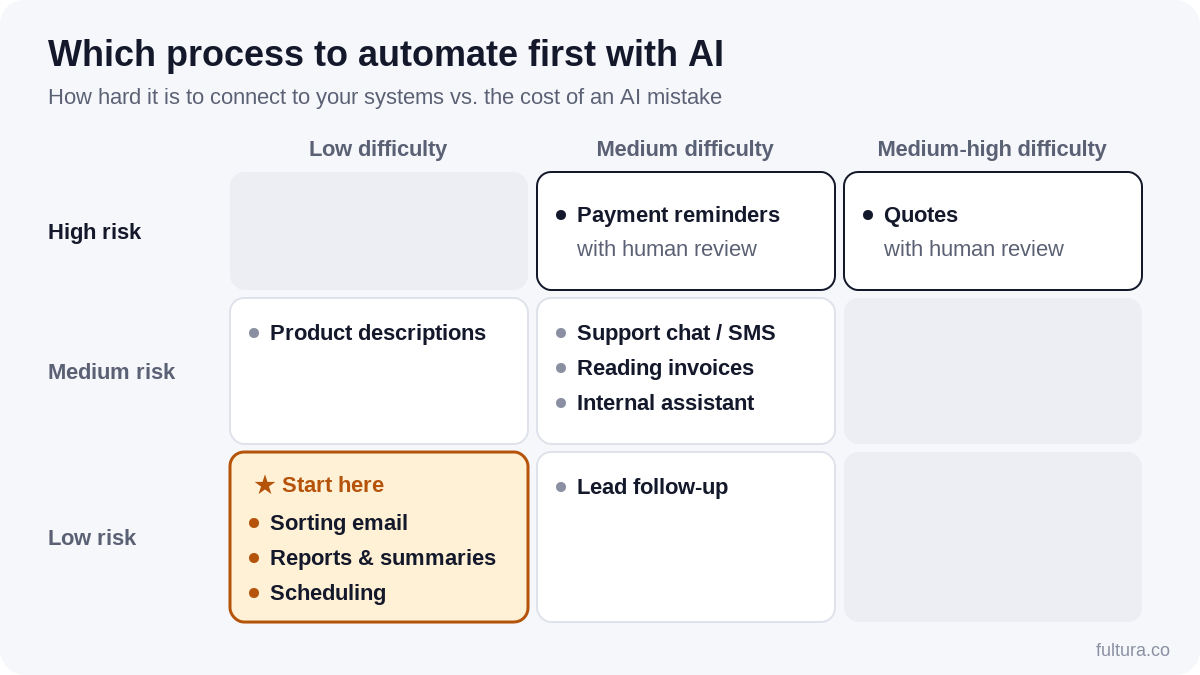 The 10 processes by how hard they are to connect and how bad a mistake is: start in the bottom-left corner.