Inventory Control for Small Business: A Step-by-Step Guide
Inventory control for small business, step by step: what to track, how to set safety stock and reorder points, ABC analysis, cycle counts, with an example.
The best inventory management software for small business in 2026: Sortly, Zoho, QuickBooks, Cin7 and more. Who each one fits and how to choose in an afternoon.
The best inventory management software for small business in 2026 depends on how you sell. For most US small businesses, the shortlist is Sortly, Zoho Inventory, inFlow, Cin7, QuickBooks Online, Square for Retail, Odoo and Katana. The question that narrows it fastest: do you want inventory inside your accounting or point-of-sale system, or do you need a dedicated inventory tool that connects to them?
If you already do your books in QuickBooks and your stock is simple, start with QuickBooks Online Plus or Advanced. Running a store or café? Look at Square for Retail. Growing wholesaler or multichannel seller? Compare Cin7 and inFlow. Make what you sell? Katana. Just starting? Try Zoho Inventory’s free plan. And if none fit how you work, a custom system may be worth it. Below: each option, a comparison table, and a worked example.
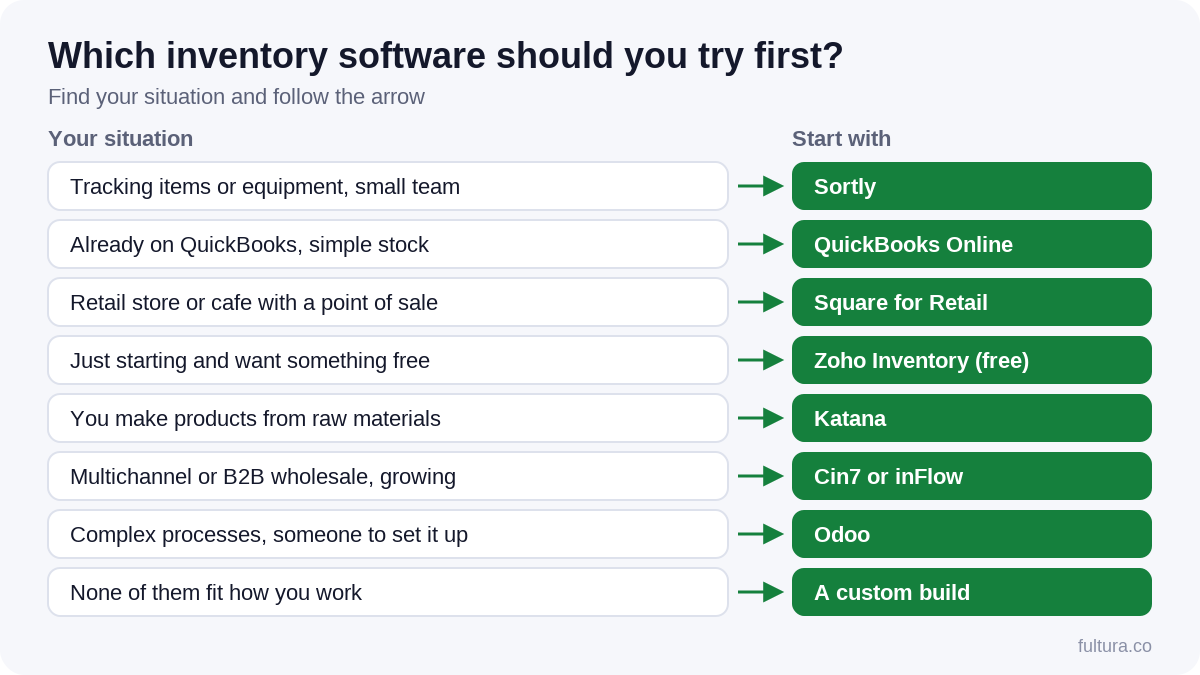 Which inventory software to try first, based on your situation.
We’re a software agency. We build custom systems, so we have a bias toward custom, and we’ll be upfront about it. That’s also why we’ll tell you clearly when you don’t need one: most small businesses should start with an off-the-shelf tool.
We checked each vendor’s public information as of publication. We left out most prices because they change often and third-party listings disagree. Where a fact is easy to verify (a free plan, a trial, which plan includes inventory), we mention it. Confirm current terms before you decide.
Every tool here runs in the cloud, is widely used by US small businesses, and fits companies that buy and sell physical goods.
Sortly is a mobile-first inventory app built around photos, folders and barcode or QR scanning. It’s popular with contractors, small warehouses, schools and anyone tracking tools, supplies or equipment rather than running high-volume sales. As of publication, its free plan covers 1 user and 100 unique items, and paid plans come with a 14-day free trial.
Zoho Inventory handles stock, sales orders, purchase orders and shipping, and it connects with the rest of Zoho’s apps (Books, CRM) plus e-commerce channels like Shopify. As of publication, the free plan includes 1 user, 1 location and 50 orders a month. Paid plans add users, order volume and more warehouses.
inFlow covers stock across locations, purchasing, sales orders, barcode scanning and basic manufacturing (assembling products from components), with integrations for accounting and e-commerce tools. As of publication, there’s no free plan, but every plan has a 14-day free trial.
Cin7 sells two products. Cin7 Core covers multi-location stock, purchasing, bills of materials, B2B ordering and many sales channel and accounting integrations. Cin7 Omni is the enterprise option, quoted case by case. As of publication, Core has published plans and Omni is “contact us.”
If your accountant already lives in QuickBooks Online, its built-in inventory may be enough. As of publication, inventory tracking is available only on the Plus and Advanced plans. Advanced adds a choice between FIFO and average costing and more detailed valuation reports. QuickBooks also handles invoicing and sales tax, so inventory, sales and accounting stay in one place.
Square for Retail is a point-of-sale system with inventory built in: stock counts update with each sale, and you get low-stock alerts. As of publication, it has a free plan with no monthly fee (you pay card processing), and the paid Plus plan adds advanced inventory tools such as purchase orders and transfers between locations.
Odoo is an open-source ERP with dozens of connected apps: inventory, sales, purchasing, accounting, point of sale, manufacturing. As of publication, its One App Free plan lets you run a single app, such as Inventory, free with unlimited users on Odoo Online.
Katana is built for small manufacturers and makers: raw materials, bills of materials, production orders and finished-goods stock. It integrates with Shopify and with QuickBooks Online and Xero, so sales flow in and invoices flow out to your books.
| Software | Best for | Free plan or trial* | Multiple locations | Built-in accounting | Manufacturing |
|---|---|---|---|---|---|
| Sortly | Tracking items and equipment | Free plan (1 user, 100 items); 14-day trial on paid | Yes (folders/locations) | No | No |
| Zoho Inventory | Starting free, small online stores | Free plan (1 user, 1 location, 50 orders/mo) | On paid plans | Via Zoho Books | Basic (assemblies) |
| inFlow | Small wholesalers and distributors | 14-day trial | Yes, by plan | No (integrates) | Basic |
| Cin7 | Multichannel and B2B at scale | Check with vendor | Yes | No (integrates) | Yes (BOMs) |
| QuickBooks Online | Simple stock inside your books | Check with vendor | Limited | Yes | No |
| Square for Retail | Stores with a register | Free plan | On Plus | No | No |
| Odoo | Complex processes, future ERP | One App Free | Yes | Separate app | Separate app |
| Katana | Small manufacturers | Check with vendor | Yes | No (integrates) | Yes |
*As of publication. “Check with vendor” means we couldn’t confirm a current, clearly published answer.
Not sure what to track or when to reorder yet? Start with our guide to inventory control for small business, which covers reorder points, safety stock and cycle counts. Any software works better once the process is clear. And if you’d like a second opinion on your shortlist, book a free 30-minute call. We’ll tell you if an off-the-shelf tool is the right answer, which it often is.
Answer these questions before you book a single demo. They’ll cut the list in half.
This is the biggest fork. If you want one system for sales, books and stock, look at QuickBooks Online, Square for Retail or Odoo. If your accounting already works and inventory is what hurts, pick a dedicated tool that connects to QuickBooks or Xero.
Count everyone: receiving, sales, shipping, the manager. Many plans charge or cap by user. A cheap plan for one person can get expensive for five, and shared logins mean nobody knows who changed what.
Warehouses, stores, vans, a 3PL. Entry plans often allow one. If you have two, or plan to open one this year, filter on that first.
Some plans cap monthly orders. Use your real numbers from a busy month.
Shopify, Amazon, a retail counter, wholesale accounts. Every channel you sell on needs to update the same stock count. Check that the integration exists and that it syncs in both directions.
The owner or the accountant picks the software, but the person at the counter or in the warehouse uses it. If they find it slow, they stop scanning and your counts drift. Have them test it.
Buying by the case and selling by the unit, kits and bundles, lot and expiration tracking, customer-specific pricing. Write down your edge cases and test them in each tool. If none handle them without hacks, that’s where a custom or heavily configured system starts to make sense. Our custom software vs off-the-shelf comparison walks through that decision with a three-year cost view.
Ask whether you can export items, stock movements and customers as CSV or Excel. Switching is always work. It shouldn’t be impossible.
Picture a cleaning-supplies distributor with 2 warehouses, about 1,200 SKUs, 4 people recording stock, and around 30 orders a day, roughly 650 orders a month working Monday to Saturday. They already invoice and do their books in QuickBooks Online, and they sell some products on Shopify.
Here’s how the list filters:
Ten minutes, and eight options became three paths. Now demos are worth the time.
Then compare costs over three years, not one month. The numbers below are illustrative, not quotes. Say the dedicated app costs $300 a month plus $3,000 for setup and data migration: that’s $13,800 over three years. A custom system built by a nearshore team might run $40,000 to build plus $500 a month for hosting and support: $58,000. The off-the-shelf app wins easily.
Now say the app doesn’t handle their case-to-unit conversions, and two people spend 5 hours a week each fixing counts in a spreadsheet. At $25 an hour, that’s $250 a week, or about $39,000 over three years. The gap shrinks fast. Run this math with your own numbers before anyone, including us, tells you what to buy. Our article on how much custom software costs explains what drives build prices.
For most small businesses, it doesn’t, at least not at first. Start with an off-the-shelf tool if it covers your core process and your team can live with its quirks.
Custom starts to pay off when:
What it costs, roughly. A focused inventory system (items, locations, stock movements, purchase orders, low-stock alerts, reports, user permissions, plus a QuickBooks or Shopify connection) often lands somewhere around $60,000 to $150,000 with a US agency and around $30,000 to $80,000 with a nearshore team. These are orientative ranges. What moves the number: how many integrations you need, barcode and mobile workflows, how messy your existing data is, and how many roles and approval steps you have.
What nearshore means here. A nearshore team works from Latin America, in US time zones or close to them (Colombia is UTC-5, the same as US Eastern during part of the year), in English, at lower rates than US agencies. It fits when you want live calls during your workday and weekly demos without paying US agency rates. It doesn’t fit if you need someone on site, or if your project requires a US-based team for compliance reasons. Whoever you hire, make sure you own the code.
The one your team will actually use every day, and that solves your main problem without forcing you to change how you work.
In short:
Write your requirements using the eight questions above, cross off what doesn’t fit, and demo only two or three tools. You’ll decide in a week instead of three months.
There's no single winner. QuickBooks Online Plus or Advanced fits if you already do your books there and your stock is simple; Square for Retail fits stores with a point of sale; Cin7 or inFlow fit growing wholesalers and multichannel sellers; Sortly fits teams tracking items and equipment.
Yes, with limits. As of publication, Zoho Inventory has a free plan for 1 user, 1 location and 50 orders a month, Sortly's free plan covers 1 user and 100 items, Square for Retail has a free plan, and Odoo lets you run one app, such as Inventory, free with unlimited users on Odoo Online.
Yes, but only on the Plus and Advanced plans. Advanced adds a choice between FIFO and average costing and more detailed inventory valuation; if you need multiple warehouses, barcode workflows or manufacturing, most businesses pair QuickBooks with a dedicated inventory app.
A spreadsheet works when one person records everything and you have a few hundred items in one location. Move to software when several people log stock movements, you have more than one location, or you sell on more than one channel.
It depends on users, locations, order volume and features. Plans range from free tiers with tight limits to several hundred dollars a month for wholesale and multichannel tools, plus setup; compare the total cost over two or three years, not the monthly price.
When your team spends hours every week on workarounds, double entry or spreadsheets running beside the software, and no off-the-shelf tool handles your core process. If an existing app covers 80% of what you do, use it and adapt.
Tell us where your current tool or spreadsheet breaks. In a free 30-minute call we'll tell you honestly whether an off-the-shelf app will do, or what a custom inventory system would take and roughly cost.