Best Inventory Management Software for Small Business: 8 Options Compared (2026)
The best inventory management software for small business in 2026: Sortly, Zoho, QuickBooks, Cin7 and more. Who each one fits and how to choose in an afternoon.
Inventory control for small business, step by step: what to track, how to set safety stock and reorder points, ABC analysis, cycle counts, with an example.
Inventory control for small business comes down to three things: know what you have, where it is and what it’s worth, and use that to decide what to buy and when. In practice that means five steps: clean up your product list, record every stock movement as it happens, set a safety stock and reorder point for each key item, rank items with ABC analysis, and count a small slice of stock every week instead of once a year.
You don’t need a warehouse system or a logistics background to do this. A notebook works for a while, a spreadsheet works for longer, and software takes over when the business grows. This guide walks through each step with a worked example, so you can start this week with whatever tool you already use.
If a customer has ever asked for something you “definitely had” and you couldn’t find it, or you’ve found boxes of something that hasn’t sold in a year, you already know the cost. Poor inventory control isn’t an accounting problem. It’s cash lost every day, in sales you miss and in stock that sits still.
Inventory control means knowing, at any moment, what you have, where it is and what it’s worth, and acting on it.
It isn’t a once-a-year count to close the books. That count has its place, but if it’s all you do, you find problems months after they happen. Real control is a daily habit: everything that comes in or goes out gets recorded when it moves.
Good inventory control does three jobs:
It works the same for a retail store, a hardware store, a distributor, a restaurant, an auto-parts shop or an online seller.
Every product needs one clear record before you count anything. This is the step most people skip, and it causes the most trouble later. If the same screw shows up as “1in screw”, “screw 1"” and “drywall screw”, you’ll never know how many you have.
For each product, set:
If your list is a mess today, start with your top sellers. You don’t need a perfect catalog to begin.
Your inventory numbers are only as good as your records. Log each movement when it happens, not at the end of the day “when there’s time”. If you sell through a point of sale or an online store such as Square or Shopify, sales are already being recorded; make sure receiving, transfers and adjustments are too.
| Movement | What it is | What to record |
|---|---|---|
| Receiving | Stock arrives from a supplier | Item, quantity, unit cost, supplier, date |
| Sale | Stock goes out to a customer | Item, quantity, date |
| Transfer | Stock moves between locations | From, to, quantity |
| Return | A customer returns, or you return to a supplier | Reason and condition |
| Adjustment | Damage, expiry, or a count difference | Reason and who approved it |
One rule pays for itself: record who made each movement. It’s not about distrust. When a number doesn’t add up, you can trace it in minutes instead of losing an afternoon.
This is where your records start making decisions for you. You need two numbers per key product, and the math fits on a sticky note.
Safety stock is the cushion that protects you when sales spike or a supplier runs late. The simple version:
Safety stock = average daily sales × days of cushion
Days of cushion is how many days of late delivery or extra demand you want to cover. A reliable supplier might need two or three days. One that’s often late needs more.
The reorder point is the stock level at which you place an order, so new stock arrives before you hit zero:
Reorder point = (average daily sales × lead time in days) + safety stock
Lead time is the number of days from placing the order to having the goods on your shelf, not just the shipping time.
Say a hardware store sells an average of 12 bags of concrete mix a day. The supplier takes 5 days to deliver and is sometimes a couple of days late, so the owner wants 3 days of cushion.
When stock hits 96 bags, it’s time to order. Over the five days of waiting the store sells about 60, so when the truck arrives there are still about 36 left. If the truck is two days late, those 36 bags cover it with 12 to spare.
The order size is a separate decision. If the owner orders 180 bags (about 15 days of sales), stock goes back up to 216 each time a delivery lands, and the cycle repeats roughly every two weeks.
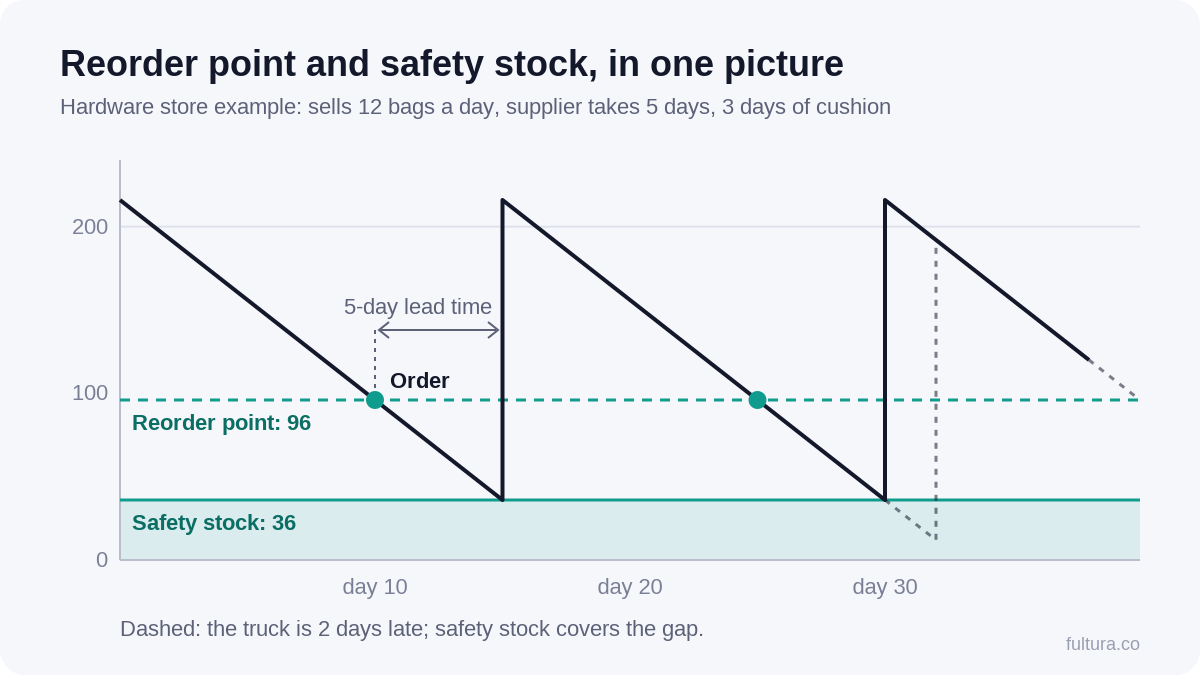 Order at the reorder point; safety stock absorbs a late truck.
If your sales or your supplier swing a lot, use this version instead:
Safety stock = (max daily sales × max lead time) − (average daily sales × average lead time)
With the same store: on its busiest days it sells 18 bags, and the worst delivery took 7 days. That gives (18 × 7) − (12 × 5) = 126 − 60 = 66 bags. That’s a much bigger cushion, and more cash sitting in the stockroom. Use it for items where running out really hurts, and the simple version for the rest.
Do this for your top 20 to 30 products first. Then revisit the numbers every quarter. Sales change with the season, and a reorder point that works in March can come up short in November.
Not every product deserves the same attention. ABC analysis splits your catalog by how much each item contributes to sales:
The cutoffs are a rule of thumb, not a law. Adjust them to your business.
Here’s a simplified example. A store with 400 SKUs might find that 50 of them make up 80% of sales (A), 100 more take it to 95% (B), and the remaining 250 bring in the last 5% (C). The owner now knows where to spend time: get the reorder points right on those 50, and look hard at C items that haven’t sold in 90 days. Some are worth clearing out and not reordering.
A full annual count is painful. You close, you pull in the whole team, and by the time you find differences, nobody remembers what happened. Cycle counting is the alternative: count a small part of your stock every week.
A routine that works:
Within a few weeks you’ve counted everything without closing for a day, and you know how much you can trust your numbers. Your accountant will still want a full count at year end; cycle counts make that one much less painful.
All three can work. It depends on where your business is today.
| Notebook | Spreadsheet (Excel, Google Sheets) | Inventory software | |
|---|---|---|---|
| Cost to start | Almost nothing | Low | Monthly subscription or a one-time build |
| Number of products | Very few | Dozens to a few hundred | Thousands |
| Several people at once | No | Risky | Yes, with permissions |
| Several locations | No | Hard | Yes |
| Low-stock alerts | No | Manual formulas | Automatic |
| From your phone | No | Limited | Yes |
| Who changed what | No | Rarely | Every movement is logged |
A spreadsheet is a good place to start. With a products sheet, a movements sheet and a few formulas you can apply everything in this guide. The trouble comes with growth: two people edit different copies, someone deletes a formula, and nobody knows which file is the right one.
Signs it’s time to move to software:
If two or more of these sound familiar, the hours spent reconciling and the sales you lose are probably already costing more than a system would.
Most small businesses should start with an off-the-shelf app. Subscriptions run from free tiers for very small catalogs to a few hundred dollars a month, depending on users, locations and integrations. Our comparison of the best inventory management software for small business goes through the main options and who each one fits.
A custom system makes sense when your process is the thing that sets you apart and no app models it: kits and bundles assembled to order, lots and expiry dates across several warehouses, odd units of measure, or a flow that touches your accounting, e-commerce and delivery tools in ways no plug-in covers. Our guide on custom software vs off-the-shelf has a decision matrix for this.
As a rough orientation, a focused custom inventory system (products, movements, reorder alerts, counts, roles, and one or two integrations such as QuickBooks or Shopify) often lands somewhere around $50,000 to $150,000 with a US agency, and roughly $20,000 to $60,000 with a nearshore team. What moves the number: how many locations and user roles, barcode scanning, a mobile app, and how many systems it has to sync with. The breakdown is in how much custom software costs in 2026.
Where we fit, honestly. We’re a nearshore team in Colombia (UTC-5, so same or close working hours to most of the US), and we build custom internal systems with weekly demos; you own the code. If you’re still on a notebook or a simple spreadsheet, you don’t need us yet: fix the habit first with the steps above, then try an off-the-shelf app. If you’ve tried the apps and keep working around them, book a free 30-minute call and we’ll tell you whether custom is worth it for you, even if the answer is no.
You don’t have to do it all at once. A realistic plan:
The tool matters less than the habit. Record everything, review often, and any system you choose will work better.
Do a full count once or twice a year and short cycle counts every week. Count your best sellers (A items) most often, so you catch errors while people still remember what happened.
Multiply your average daily sales by your supplier's lead time in days, then add your safety stock. When stock on hand drops to that number, place the order.
Safety stock is the cushion you keep for days when sales run higher than usual or a delivery shows up late. A simple way to set it is average daily sales times the number of extra days you want to cover.
Yes, to start, with a few dozen to a few hundred items and one person updating it. It stops working when several people edit it, you have more than one location, or you need live stock levels from your phone.
ABC analysis ranks your products by how much revenue they bring in. A items are the few that make most of your sales, B items are the middle, and C items are the long tail that ties up cash. You watch A items closely and question C items.
Tell us how stock moves through your business: locations, suppliers, how you sell. In a free 30-minute call we'll tell you whether an off-the-shelf tool will do or what a custom inventory system would take.